

Architecture Overview#
torchTextClassifiers is a modular, component-based framework for text classification. Rather than a black box, it provides clear, reusable components that you can understand, configure, and compose.
The Pipeline#
At its core, torchTextClassifiers processes data through a simple pipeline:
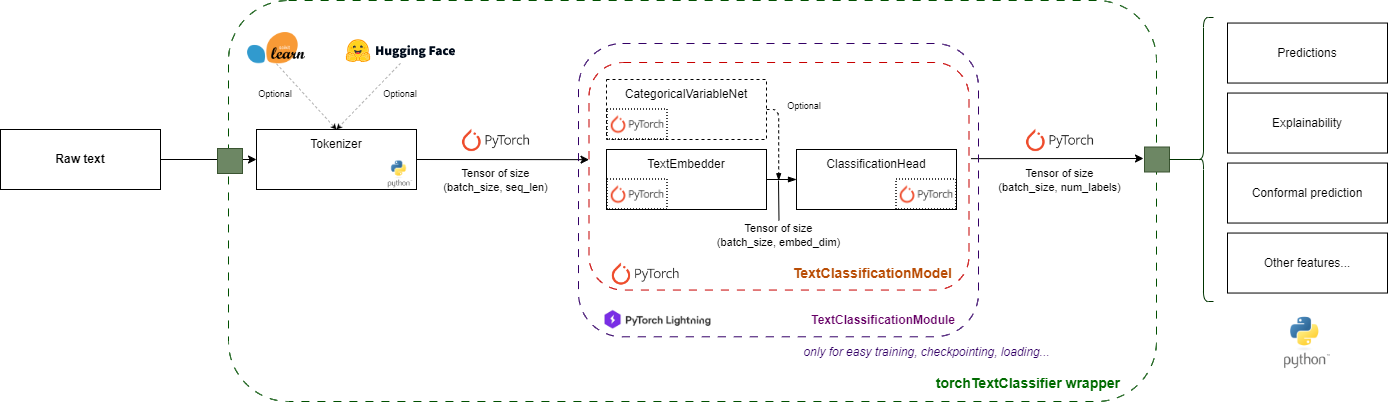
Data Flow:
ValueEncoder (optional) converts raw string categorical values and labels into integers
Text is tokenized into numerical tokens
Tokens are embedded into dense vectors (with optional self-attention) — or into one embedding per class if label attention is enabled
Categorical variables (optional) are embedded separately
All embeddings are combined
Classification head produces final predictions — if a
ValueEncoderwas provided, integer predictions are decoded back to original labels
Component 0: ValueEncoder (optional preprocessing)#
Purpose: Encode raw string (or mixed-type) categorical values and labels into integer indices, and decode predicted integers back to original label values after inference.
When to Use#
Use ValueEncoder whenever your categorical features or labels are stored as strings
(e.g. "Electronics", "positive") rather than integers. Without it, you must
integer-encode inputs manually before passing them to train / predict.
Building a ValueEncoder#
from sklearn.preprocessing import LabelEncoder
from torchTextClassifiers.value_encoder import DictEncoder, ValueEncoder

# Option A: sklearn LabelEncoder (fit on train data)
cat_encoder = LabelEncoder().fit(X_train_categories)

# Option B: explicit dict mapping
cat_encoder = DictEncoder({"Electronics": 0, "Audio": 1, "Books": 2})

value_encoder = ValueEncoder(
    label_encoder=LabelEncoder().fit(y_train),   # encodes/decodes labels
    categorical_encoders={
        "category": cat_encoder,                  # one entry per categorical column
        # "brand": brand_encoder,                 # add more as needed
    },
)
What It Provides#
value_encoder.vocabulary_sizes   # [3, ...]  – inferred from each encoder
value_encoder.num_classes        # 2          – inferred from label encoder
These are read automatically by torchTextClassifiers when constructing the model,
so you don’t need to set num_classes or categorical_vocabulary_sizes in ModelConfig
manually.
Integration with the Wrapper#
classifier = torchTextClassifiers(
    tokenizer=tokenizer,
    model_config=ModelConfig(embedding_dim=64),   # num_classes inferred from encoder
    value_encoder=value_encoder,
)

# Train with raw string inputs (default: raw_categorical_inputs=True, raw_labels=True)
classifier.train(X_train, y_train, training_config)

# Predict — output labels are decoded back to original strings automatically
result = classifier.predict(X_test)
print(result["prediction"])   # ["positive", "negative", ...]
The ValueEncoder is saved and reloaded with the model via classifier.save() /
torchTextClassifiers.load().
Component 1: Tokenizer#
Purpose: Convert text strings into numerical tokens that the model can process.
Available Tokenizers#
torchTextClassifiers supports three tokenization strategies:
NGramTokenizer (FastText-style)#
Character n-gram tokenization for robustness to typos and rare words.
from torchTextClassifiers.tokenizers import NGramTokenizer

tokenizer = NGramTokenizer(
    vocab_size=10000,
    min_n=3,  # Minimum n-gram size
    max_n=6,  # Maximum n-gram size
)
tokenizer.train(training_texts)
When to use:
Text with typos or non-standard spellings
Morphologically rich languages
Limited training data
WordPieceTokenizer#
Subword tokenization for balanced vocabulary coverage.
from torchTextClassifiers.tokenizers import WordPieceTokenizer

tokenizer = WordPieceTokenizer(vocab_size=5000)
tokenizer.train(training_texts)
When to use:
Standard text classification
Moderate vocabulary size
Good balance of coverage and granularity
HuggingFaceTokenizer#
Use pre-trained tokenizers from HuggingFace.
from torchTextClassifiers.tokenizers import HuggingFaceTokenizer
from transformers import AutoTokenizer

hf_tokenizer = AutoTokenizer.from_pretrained("bert-base-uncased")
tokenizer = HuggingFaceTokenizer(tokenizer=hf_tokenizer)
When to use:
Transfer learning from pre-trained models
Need specific language support
Want to leverage existing tokenizers
Tokenizer Output#
All tokenizers produce the same output format:
output = tokenizer(["Hello world!", "Text classification"])
# output.input_ids: Token indices (batch_size, seq_len)
# output.attention_mask: Attention mask (batch_size, seq_len)
Component 2: Text Embedding Pipeline (TokenEmbedder + SentenceEmbedder)#
Purpose: Convert tokens into a single dense vector per sample (or one per class with label attention).
Text embedding is split into two distinct, composable stages:
TokenEmbedder: maps each input token to a dense vector, with optional self-attention. Output shape:(batch, seq_len, embedding_dim).SentenceEmbedder: aggregates per-token vectors into a fixed-size sentence representation. Output shape:(batch, embedding_dim), or(batch, num_classes, embedding_dim)when label attention is enabled.
Stage 1 — TokenEmbedder#
from torchTextClassifiers.model.components import TokenEmbedder, TokenEmbedderConfig

config = TokenEmbedderConfig(
    vocab_size=5000,
    embedding_dim=128,
    padding_idx=0,
)
token_embedder = TokenEmbedder(config)

# Forward pass — returns a dict
out = token_embedder(input_ids, attention_mask)
# out["token_embeddings"]: (batch_size, seq_len, 128)
With Self-Attention (Optional)#
Add transformer-style self-attention for better contextual understanding:
from torchTextClassifiers.model.components import AttentionConfig, TokenEmbedder, TokenEmbedderConfig

attention_config = AttentionConfig(
    n_layers=2,
    n_head=4,
    n_kv_head=4,
    positional_encoding=False,
)

config = TokenEmbedderConfig(
    vocab_size=5000,
    embedding_dim=128,
    padding_idx=0,
    attention_config=attention_config,
)
token_embedder = TokenEmbedder(config)
When to use attention:
Long documents where context matters
Tasks requiring understanding of word relationships
When you have sufficient training data
Configuration:
embedding_dim: Size of embedding vectors (e.g., 64, 128, 256)n_head: Number of attention heads (typically 4, 8, or 16)n_layers: Depth of transformer (start with 2-3)
Stage 2 — SentenceEmbedder#
SentenceEmbedder collapses the (batch, seq_len, dim) token matrix into a sentence vector using one of several aggregation strategies:
from torchTextClassifiers.model.components import SentenceEmbedder, SentenceEmbedderConfig

# Mean-pooling (default)
sentence_embedder = SentenceEmbedder(SentenceEmbedderConfig(aggregation_method="mean"))

out = sentence_embedder(token_embeddings, attention_mask)
# out["sentence_embedding"]: (batch_size, 128)
Available aggregation methods:
|
Description |
|---|---|
|
Masked mean of token embeddings |
|
First token (e.g. |
|
Last non-padding token (GPT-style) |
|
Use label attention (see below) |
With Label Attention (Optional Explainability Layer)#
Setting aggregation_method=None and providing a LabelAttentionConfig replaces
mean-pooling with a cross-attention mechanism where each class has a learnable
embedding that attends over the token sequence:
Token embeddings (batch, seq_len, d)
        ↓   cross-attention (labels as queries, tokens as keys/values)
Sentence embeddings (batch, num_classes, d)   ← one per class
        ↓
ClassificationHead  (d → 1)                   ← shared, applied per class
        ↓
Logits (batch, num_classes)
Enable it by setting n_heads_label_attention in ModelConfig (high-level API):
model_config = ModelConfig(
    embedding_dim=96,
    num_classes=6,
    n_heads_label_attention=4,   # number of attention heads for label attention
)
Or directly with the low-level components:
from torchTextClassifiers.model.components import (
    LabelAttentionConfig, SentenceEmbedder, SentenceEmbedderConfig,
)

sentence_embedder = SentenceEmbedder(SentenceEmbedderConfig(
    aggregation_method=None,
    label_attention_config=LabelAttentionConfig(
        n_head=4,
        num_classes=6,
        embedding_dim=96,
    ),
))
Benefits:
Free explainability at inference time (
explain_with_label_attention=Trueinpredict)The returned attention matrix
(batch, n_head, num_classes, seq_len)shows which tokens each class focuses onCan be combined with self-attention in
TokenEmbedder
Constraint: embedding_dim must be divisible by n_heads_label_attention.
Component 3: Categorical Variable Handler#
Purpose: Process categorical features (like user demographics, product categories) alongside text.
When to Use#
Add categorical features when you have structured data that complements text:
User age, location, or demographics
Product categories or attributes
Document metadata (source, type, etc.)
Setup#
from torchTextClassifiers.model.components import (
    CategoricalVariableNet,
    CategoricalForwardType
)

# Example: 3 categorical variables
# - Variable 1: 10 possible values
# - Variable 2: 5 possible values
# - Variable 3: 20 possible values

cat_handler = CategoricalVariableNet(
    vocabulary_sizes=[10, 5, 20],
    embedding_dims=[8, 4, 16],    # Embedding size for each
    forward_type=CategoricalForwardType.AVERAGE_AND_CONCAT
)
Combination Strategies#
The forward_type controls how categorical embeddings are combined:
AVERAGE_AND_CONCAT#
Average all categorical embeddings, then concatenate with text:
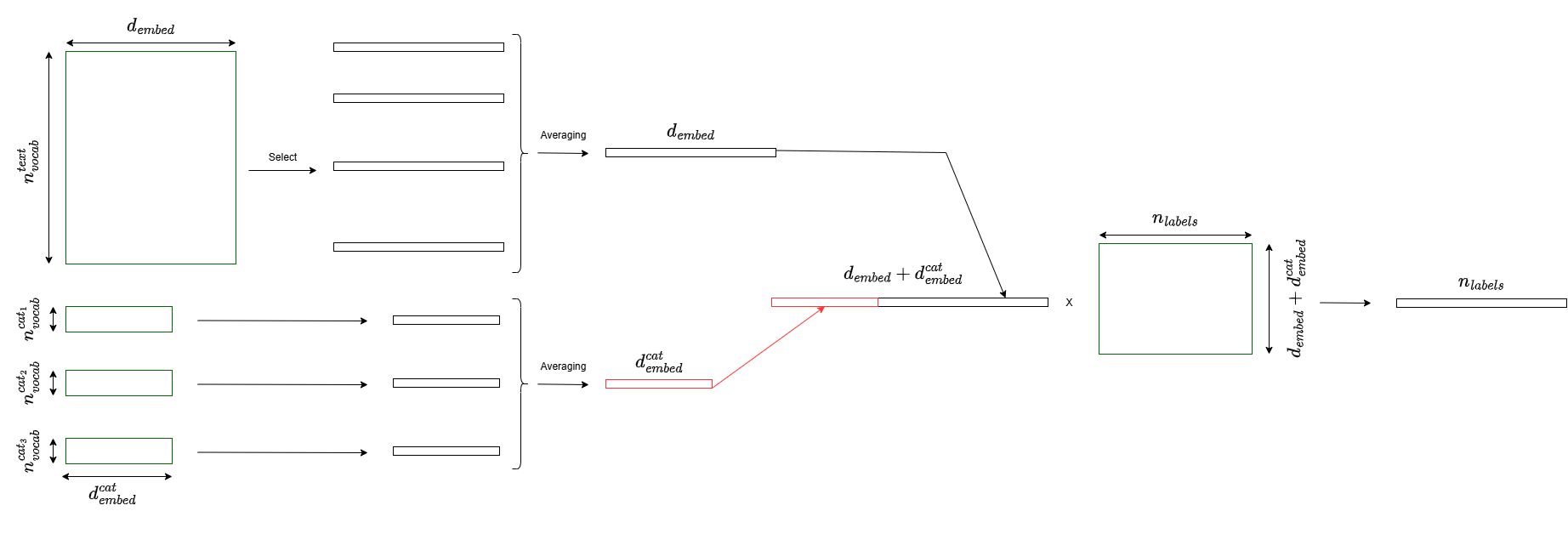
forward_type=CategoricalForwardType.AVERAGE_AND_CONCAT
Output size: text_embedding_dim + sum(categorical_embedding_dims)/n_categoricals
When to use: When categorical variables are equally important
CONCATENATE_ALL#
Concatenate each categorical embedding separately:
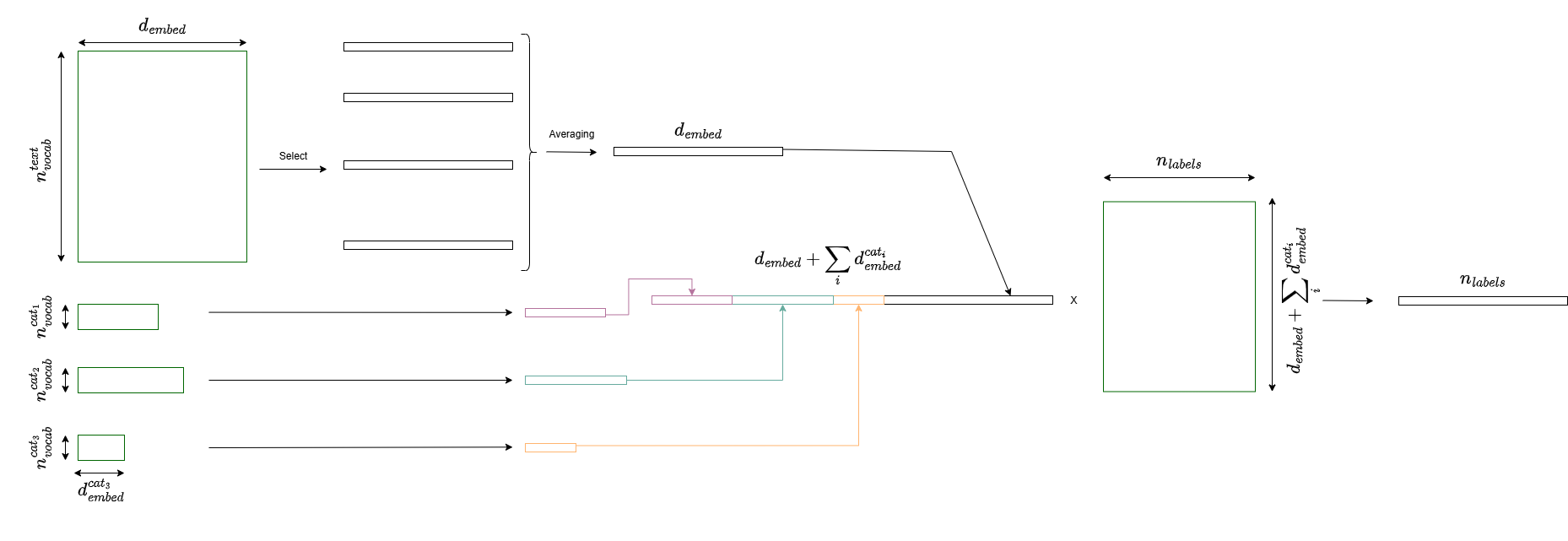
forward_type=CategoricalForwardType.CONCATENATE_ALL
Output size: text_embedding_dim + sum(categorical_embedding_dims)
When to use: When each categorical variable has unique importance
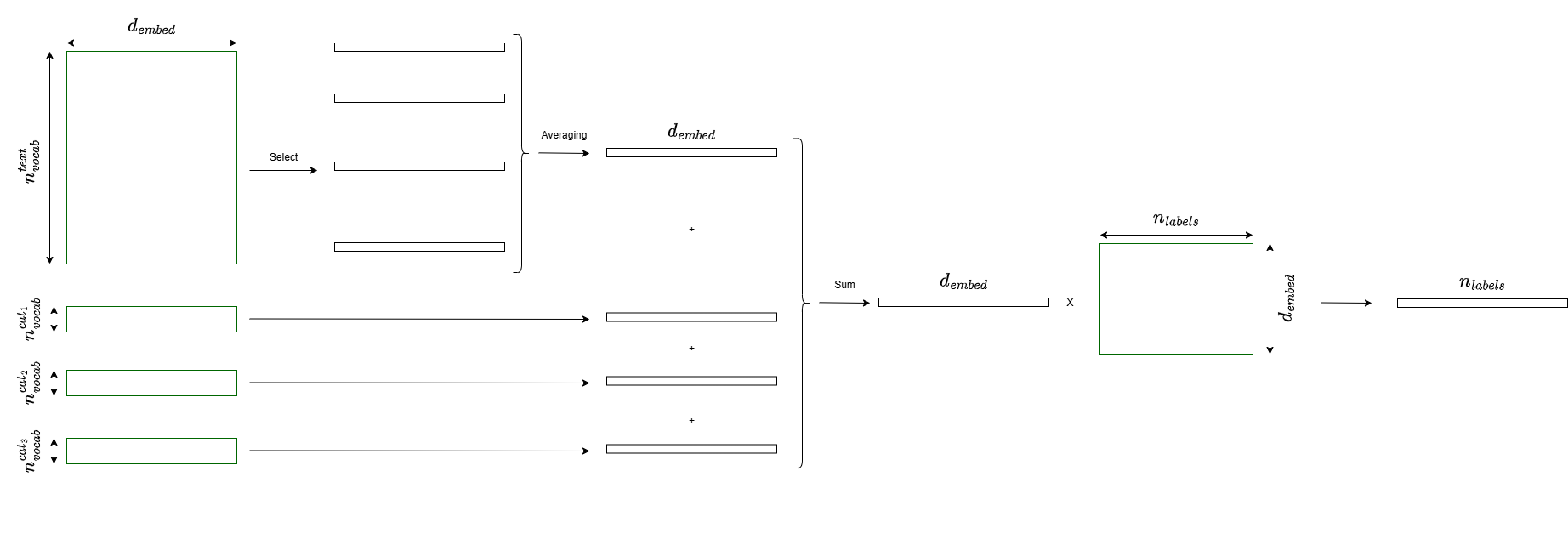
SUM_TO_TEXT#
Sum all categorical embeddings, then concatenate:
forward_type=CategoricalForwardType.SUM_TO_TEXT
Output size: text_embedding_dim + categorical_embedding_dim
When to use: To minimize output dimension
Example with Data#
# Text data
texts = ["Sample 1", "Sample 2"]

# Categorical data: (n_samples, n_categorical_variables)
categorical = np.array([
    [5, 2, 14],  # Sample 1: cat1=5, cat2=2, cat3=14
    [3, 1, 8],   # Sample 2: cat1=3, cat2=1, cat3=8
])

# Process
cat_features = cat_handler(categorical)  # Shape: (2, total_emb_dim)
Component 4: Classification Head#
Purpose: Take the combined features and produce class predictions.
Simple Classification#
from torchTextClassifiers.model.components import ClassificationHead

head = ClassificationHead(
    input_dim=152,      # 128 (text) + 24 (categorical)
    num_classes=5,      # Number of output classes
)

logits = head(combined_features)  # Shape: (batch_size, 5)
Custom Classification Head#
For more complex classification, provide your own architecture:
import torch.nn as nn

custom_head = nn.Sequential(
    nn.Linear(152, 64),
    nn.ReLU(),
    nn.Dropout(0.2),
    nn.Linear(64, 5)
)

head = ClassificationHead(net=custom_head)
Complete Architecture#
Full Model Assembly#
The framework automatically combines all components:
from torchTextClassifiers.model import TextClassificationModel
from torchTextClassifiers.model.components import (
    TokenEmbedder, TokenEmbedderConfig,
    SentenceEmbedder, SentenceEmbedderConfig,
)

token_embedder = TokenEmbedder(TokenEmbedderConfig(
    vocab_size=5000, embedding_dim=128, padding_idx=0,
))
sentence_embedder = SentenceEmbedder(SentenceEmbedderConfig(aggregation_method="mean"))

model = TextClassificationModel(
    token_embedder=token_embedder,
    sentence_embedder=sentence_embedder,
    categorical_variable_net=cat_handler,  # Optional
    classification_head=head,
)

# Forward pass
logits = model(input_ids, attention_mask, categorical_data)
Usage Examples#
Example 1: Text-Only Classification#
Simple sentiment analysis with just text:
from torchTextClassifiers import torchTextClassifiers, ModelConfig, TrainingConfig
from torchTextClassifiers.tokenizers import WordPieceTokenizer

# 1. Create tokenizer
tokenizer = WordPieceTokenizer(vocab_size=5000)
tokenizer.train(texts)

# 2. Configure model
model_config = ModelConfig(
    embedding_dim=128,
    num_classes=2,  # Binary classification
)

# 3. Train
classifier = torchTextClassifiers(tokenizer=tokenizer, model_config=model_config)
training_config = TrainingConfig(num_epochs=10, batch_size=32, lr=1e-3)
classifier.train(texts, labels, training_config=training_config)

# 4. Predict
predictions = classifier.predict(new_texts)
Example 2: Mixed Features (Text + Categorical)#
Product classification using both description and category:
import numpy as np

# Text + categorical data
texts = ["Product description...", "Another product..."]
categorical = np.array([
    [3, 1],  # Product 1: category=3, brand=1
    [5, 2],  # Product 2: category=5, brand=2
])
labels = [0, 1]

# Configure model with categorical features
model_config = ModelConfig(
    embedding_dim=128,
    num_classes=3,
    categorical_vocabulary_sizes=[10, 5],  # 10 categories, 5 brands
    categorical_embedding_dims=[8, 4],
)

# Train
classifier = torchTextClassifiers(tokenizer=tokenizer, model_config=model_config)
classifier.train(
    X_text=texts,
    y=labels,
    X_categorical=categorical,
    training_config=training_config
)
Example 3: With Attention#
For longer documents or complex text:
from torchTextClassifiers.model.components import AttentionConfig

# Add attention for better understanding
attention_config = AttentionConfig(
    n_embd=128,
    n_head=8,
    n_layer=3,
    dropout=0.1,
)

model_config = ModelConfig(
    embedding_dim=128,
    num_classes=5,
    attention_config=attention_config,  # Enable attention
)

classifier = torchTextClassifiers(tokenizer=tokenizer, model_config=model_config)
Example 4: Custom Components#
For maximum flexibility, compose components manually:
from torch import nn
from torchTextClassifiers.model.components import (
    TokenEmbedder, TokenEmbedderConfig,
    SentenceEmbedder, SentenceEmbedderConfig,
    ClassificationHead,
)

class CustomClassifier(nn.Module):
    def __init__(self):
        super().__init__()
        self.token_embedder = TokenEmbedder(TokenEmbedderConfig(
            vocab_size=5000, embedding_dim=128, padding_idx=0,
        ))
        self.sentence_embedder = SentenceEmbedder(SentenceEmbedderConfig())
        self.custom_layer = nn.Linear(128, 64)
        self.head = ClassificationHead(64, num_classes)

    def forward(self, input_ids, attention_mask):
        token_out = self.token_embedder(input_ids, attention_mask)
        sent_out = self.sentence_embedder(
            token_out["token_embeddings"], token_out["attention_mask"]
        )
        custom_features = self.custom_layer(sent_out["sentence_embedding"])
        return self.head(custom_features)
Weighting Individual Samples in the Loss (sample_weights)#
Purpose: Make some training (or validation) examples count more than others when the loss is computed — useful for class rebalancing, samples with uncertain labels, or business-driven importance weighting.
torchTextClassifiers.train() accepts an optional sample_weights array (one
weight per training example) and a separate val_sample_weights array (one
weight per validation example). Both default to 1 for every sample, which is
equivalent to not weighting at all.
import numpy as np

# Give recent/high-confidence samples more weight, e.g. 2x the default
sample_weights = np.ones(len(X_train))
sample_weights[recent_samples_mask] = 2.0

classifier.train(
    X_train, y_train,
    training_config=training_config,
    X_val=X_val, y_val=y_val,
    sample_weights=sample_weights,          # shape (len(X_train),)
    val_sample_weights=None,                # validation stays unweighted here
)
How it flows through the pipeline:
TextClassificationDatasetstores the weights and returns one per sample alongside the tokenized text, categorical variables, and label.The collate function stacks them into a
sample_weightstensor on the batch.TextClassificationModulereadsbatch["sample_weights"]and computes a weighted average loss instead of a plain mean: standardtorch.nn.*Lossobjects (e.g.CrossEntropyLoss,BCEWithLogitsLoss) are automatically switched toreduction="none"internally so each sample’s loss can be scaled by its weight before averaging.
This composes naturally with a loss’s own per-class weight= argument (e.g.
torch.nn.CrossEntropyLoss(weight=class_weights) for class imbalance) — the
per-sample loss already reflects the class weight, and sample_weights is
applied on top of it.
Custom losses (used via from_model, see below) support this the same
way standard PyTorch losses do: forward should return an unreduced,
per-sample tensor of shape (batch,) (i.e. behave like
reduction="none"), and TextClassificationModule takes care of applying
sample_weights and reducing the batch itself — MultiLevelCrossEntropyLoss
in torchTextClassifiers.contrib is a working example.
Using the High-Level API#
For most users, the torchTextClassifiers wrapper handles all the complexity:
from torchTextClassifiers import torchTextClassifiers, ModelConfig, TrainingConfig

# Simple 3-step process:
# 1. Create tokenizer and train it
# 2. Configure model architecture
# 3. Train and predict

classifier = torchTextClassifiers(tokenizer=tokenizer, model_config=model_config)
classifier.train(texts, labels, training_config=training_config)
predictions = classifier.predict(new_texts)
What the wrapper does:
Creates all components automatically
Sets up PyTorch Lightning training
Handles data loading and batching
Provides simple train/predict interface
Manages configurations
When to use the wrapper:
Standard classification tasks
Quick experimentation
Don’t need custom architecture
Want simplicity over control
Two Architecture Paths#
torchTextClassifiers offers two ways to build a classifier, covering different levels of customisation:
Path 1 — Standard architecture (ModelConfig)#
The torchTextClassifiers constructor accepts a ModelConfig and builds a
TextClassificationModel for you automatically. This covers the vast majority
of use cases: single-task binary, multi-class, or multi-label classification,
with or without categorical variables, with or without self-attention and label
attention.
from torchTextClassifiers import torchTextClassifiers, ModelConfig

classifier = torchTextClassifiers(
    tokenizer=tokenizer,
    model_config=ModelConfig(embedding_dim=128, num_classes=5),
)
classifier.train(texts, labels, training_config)
predictions = classifier.predict(new_texts)
You never instantiate TextClassificationModel directly; ModelConfig is the
only knob you need.
Path 2 — Custom architecture (from_model)#
When TextClassificationModel cannot express what you need — multiple
classification heads, shared encoders across tasks, or any other topology —
build your own nn.Module and wrap it with torchTextClassifiers.from_model.
The wrapper then provides the same predict / save / load interface around
your model.
import torch.nn as nn
from torchTextClassifiers import torchTextClassifiers

class MyModel(nn.Module):
    num_classes = 3
    categorical_variable_net = None   # or a CategoricalVariableNet instance

    def forward(self, input_ids, attention_mask, categorical_vars=None, **kwargs):
        ...
        return logits  # (batch, num_classes) — raw logits, not softmaxed

classifier = torchTextClassifiers.from_model(
    tokenizer=tokenizer,
    pytorch_model=MyModel(),
)
Required interface for custom models:
Requirement |
Details |
|---|---|
|
Exact positional names; extra kwargs are ignored |
Returns raw logits |
|
|
|
|
A |
contrib — reference custom architectures#
The torchTextClassifiers.contrib sub-package ships example architectures that
follow the from_model interface and can be used directly or as starting points:
Class |
Purpose |
|---|---|
|
Multi-task classifier: one shared |
|
Weighted cross-entropy averaged across tasks |
from torchTextClassifiers.contrib import (
    MultiLevelTextClassificationModel,
    MultiLevelCrossEntropyLoss,
)

model = MultiLevelTextClassificationModel(
    token_embedder=token_embedder,
    sentence_embedders=[se_level1, se_level2, se_level3],
    classification_heads=[head1, head2, head3],
    categorical_variable_net=cat_net,
)
classifier = torchTextClassifiers.from_model(tokenizer=tokenizer, pytorch_model=model)
See examples/multilevel_example.py for a complete working script.
For Advanced Users#
Direct PyTorch Usage#
All components are standard torch.nn.Module objects:
# All components work with standard PyTorch
isinstance(token_embedder, nn.Module)  # True
isinstance(sentence_embedder, nn.Module)  # True
isinstance(cat_handler, nn.Module)  # True
isinstance(head, nn.Module)  # True

# Use in any PyTorch code
model = TextClassificationModel(
    token_embedder=token_embedder,
    sentence_embedder=sentence_embedder,
    categorical_variable_net=cat_handler,
    classification_head=head,
)
optimizer = torch.optim.Adam(model.parameters(), lr=1e-3)

# Standard PyTorch training loop
for batch in dataloader:
    optimizer.zero_grad()
    logits = model(batch.input_ids, batch.categorical)
    loss = criterion(logits, batch.labels)
    loss.backward()
    optimizer.step()
PyTorch Lightning Integration#
For automated training with advanced features:
from torchTextClassifiers.model import TextClassificationModule
from pytorch_lightning import Trainer

# Wrap model in Lightning module
lightning_module = TextClassificationModule(
    model=model,
    loss=nn.CrossEntropyLoss(),
    optimizer=torch.optim.Adam,
    lr=1e-3,
)

# Use Lightning Trainer
trainer = Trainer(
    max_epochs=20,
    accelerator="gpu",
    devices=4,  # Multi-GPU
    callbacks=[EarlyStopping(), ModelCheckpoint()],
)
trainer.fit(lightning_module, train_dataloader, val_dataloader)
Design Philosophy#
Modularity#
Each component is independent and can be used separately:
# Use just the tokenizer
tokenizer = NGramTokenizer()

# Use just the token embedder or sentence embedder
token_embedder = TokenEmbedder(TokenEmbedderConfig(...))
sentence_embedder = SentenceEmbedder(SentenceEmbedderConfig())

# Use just the classifier head
head = ClassificationHead(input_dim, num_classes)
Flexibility#
Mix and match components for your use case:
# Text only
model = TextClassificationModel(
    token_embedder=token_embedder,
    sentence_embedder=sentence_embedder,
    categorical_variable_net=None,
    classification_head=head,
)

# Text + categorical
model = TextClassificationModel(
    token_embedder=token_embedder,
    sentence_embedder=sentence_embedder,
    categorical_variable_net=cat_handler,
    classification_head=head,
)
Simplicity#
Sensible defaults for quick starts:
# Minimal configuration
model_config = ModelConfig(embedding_dim=128, num_classes=2)

# Or detailed configuration
model_config = ModelConfig(
    embedding_dim=256,
    num_classes=10,
    categorical_vocabulary_sizes=[50, 20, 100],
    categorical_embedding_dims=[32, 16, 64],
    attention_config=AttentionConfig(n_embd=256, n_head=8, n_layer=4),
)
Extensibility#
Easy to add custom components:
class MyCustomTokenEmbedder(nn.Module):
    def __init__(self):
        super().__init__()
        # Your custom implementation

    def forward(self, input_ids, attention_mask):
        # Your custom forward pass — must return a dict with "token_embeddings"
        return {"token_embeddings": embeddings, "attention_mask": attention_mask}

# Use with existing components
model = TextClassificationModel(
    token_embedder=MyCustomTokenEmbedder(),
    sentence_embedder=SentenceEmbedder(SentenceEmbedderConfig()),
    classification_head=head,
)
Configuration Guide#
Choosing Embedding Dimension#
Task Complexity |
Data Size |
Recommended embedding_dim |
|---|---|---|
Simple (binary) |
< 1K samples |
32-64 |
Medium (3-5 classes) |
1K-10K samples |
64-128 |
Complex (10+ classes) |
10K-100K samples |
128-256 |
Very complex |
> 100K samples |
256-512 |
Attention Configuration#
Document Length |
Recommended Setup |
|---|---|
Short (< 50 tokens) |
No attention needed |
Medium (50-200 tokens) |
n_layer=2, n_head=4 |
Long (200-512 tokens) |
n_layer=3-4, n_head=8 |
Very long (> 512 tokens) |
n_layer=4-6, n_head=8-16 |
Categorical Embedding Size#
Rule of thumb: embedding_dim ≈ min(50, vocabulary_size // 2)
# For categorical variable with 100 unique values:
categorical_embedding_dim = min(50, 100 // 2) = 50

# For categorical variable with 10 unique values:
categorical_embedding_dim = min(50, 10 // 2) = 5
Summary#
torchTextClassifiers provides a component-based pipeline for text classification:
ValueEncoder (optional) → Encodes raw string inputs; decodes predictions back to original labels
Tokenizer → Converts text to tokens
TokenEmbedder → Embeds tokens into dense vectors (with optional self-attention) →
(batch, seq_len, dim)SentenceEmbedder → Aggregates token vectors into a sentence embedding (mean / first / last / label attention) →
(batch, dim)or(batch, num_classes, dim)Categorical Handler (optional) → Processes additional categorical features
Classification Head → Produces predictions
Key Benefits:
Clear data flow through intuitive components
Mix and match for your specific needs
Start simple, add complexity as needed
Full PyTorch compatibility
Next Steps#
Tutorials: See Tutorials for step-by-step guides
API Reference: Check API Reference for detailed documentation
Examples: Explore complete examples in the repository
Ready to build your classifier? Start with Quick Start!