Onyxia for Geospatial — A Satellite Imagery Use Case
Raya Berova
25 June 2026
Outline
1️⃣ Introduction
2️⃣ Onyxia
3️⃣ Pipeline Walk-through
4️⃣ GeoServer
5️⃣ Web Application
1️⃣ Introduction
The Project: Satellite Imagery at Insee
- Goal: detect buildings on satellite imagery across French overseas territories (OTs)
- Identify areas with the strongest changes in built-up land — constructions & demolitions
- Priority targets: informal settlements in French OTs
- Used to assist and optimise cartographic surveys conducted before each census
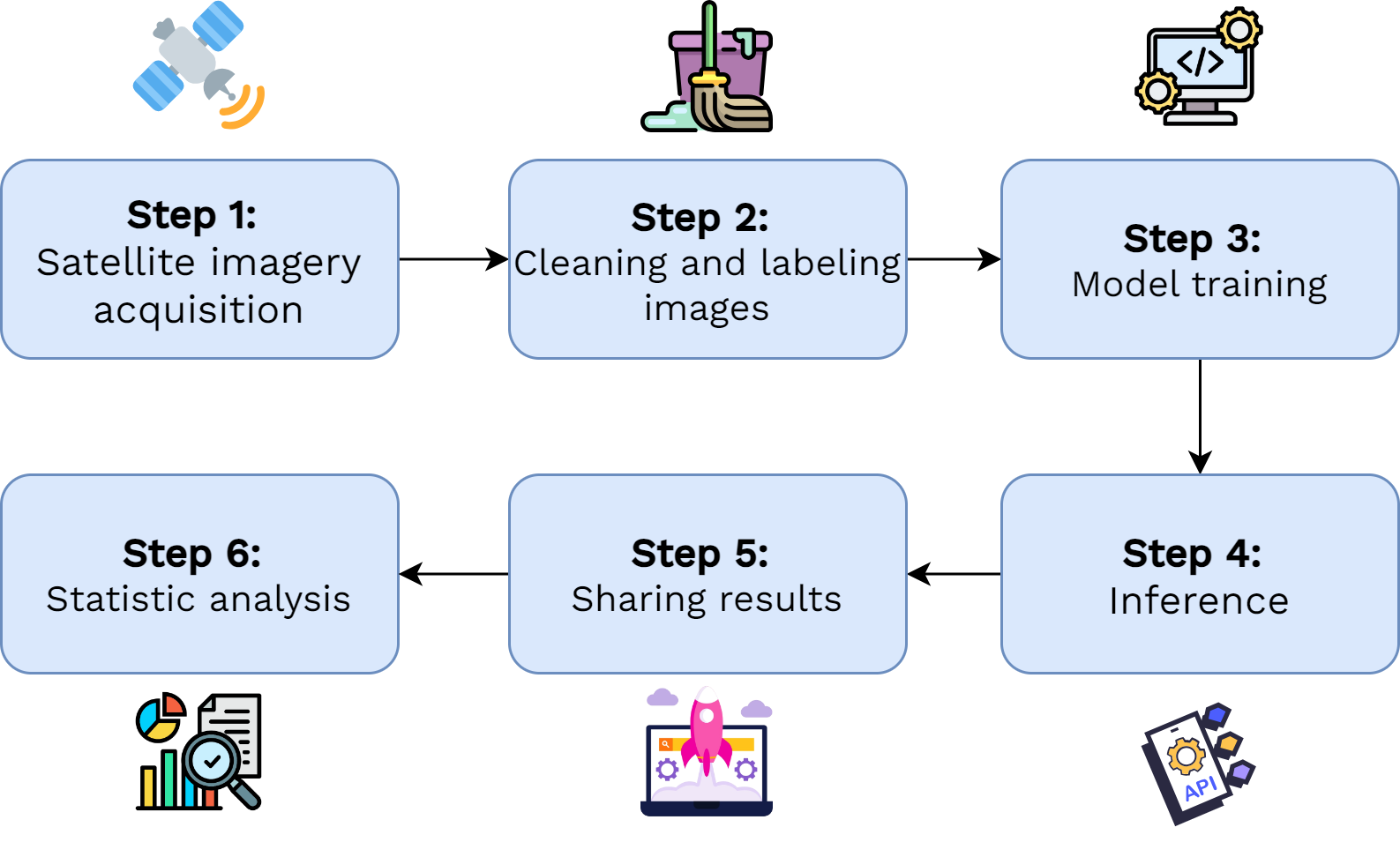
Final product and pipeline
Demo: web application
Full technical stack of the project
Entire pipeline built and run on Onyxia 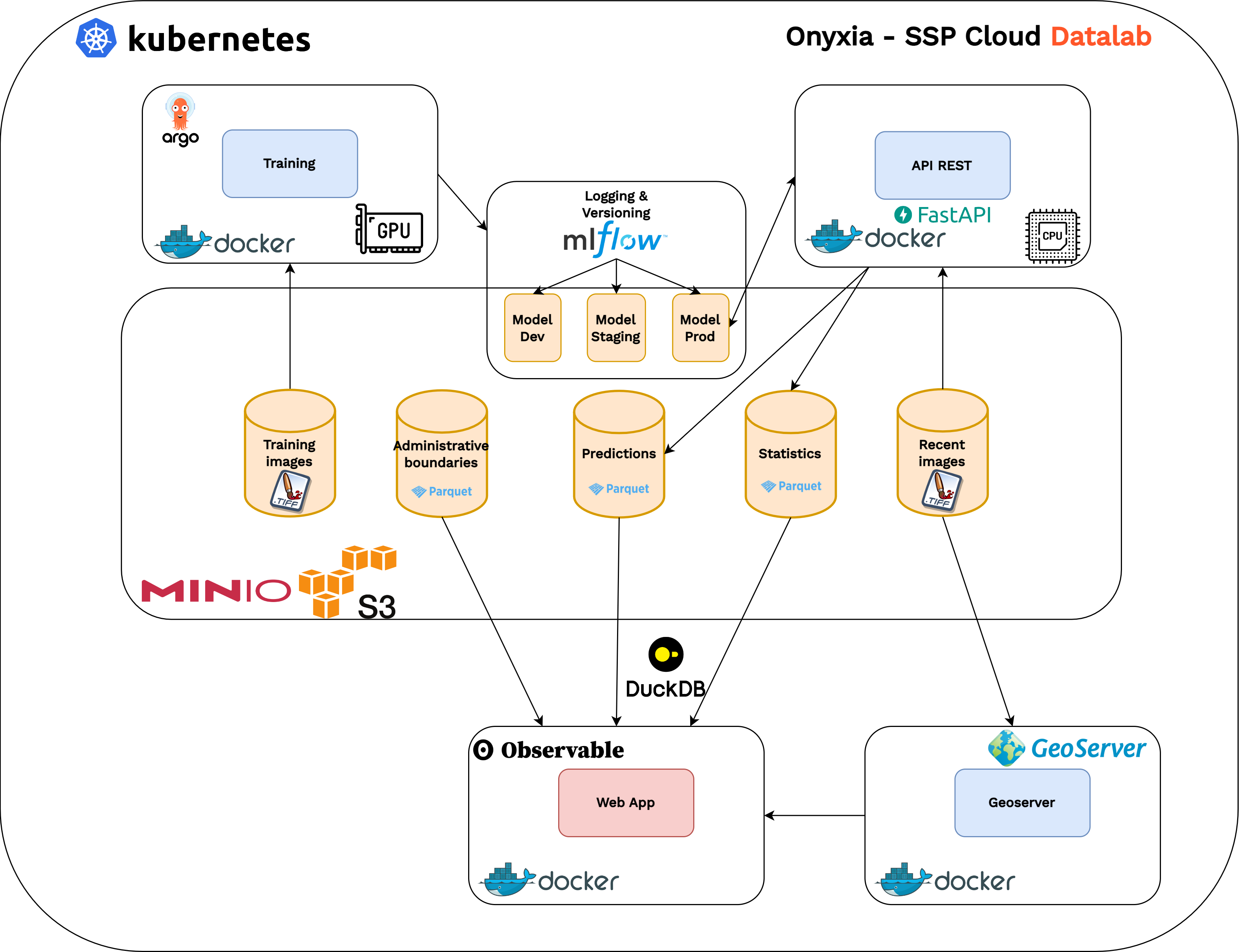
Use Case: Cyclone Chido
- Cyclone Chido hit Mayotte in late 2024 — one of the most devastating in decades
- Using our pipeline, we produced a full post-cyclone land cover map and identified destructions in a single night of computation
Outline
1️⃣ Introduction
2️⃣ Onyxia
3️⃣ Pipeline Walk-through
4️⃣ GeoServer
5️⃣ Web Application
2️⃣ Onyxia
What is Onyxia SSPCloud?
- Browser-based data science workspace — no local installation
- Launch Python, R environments with CPU / GPU allocated on demand
- Built on Kubernetes → scalable, reproducible, cloud-native
- Integrated S3 object storage — or connect to an external S3 bucket
- Project spaces: share services & data across a team
Services Used in Our Project
- VSCode / VSCode GPU
- Browser-based IDE, central tool for development & experimentation
- GPU variant for deep learning training (SegFormer fine-tuning)
- MLFlow
- Experiment tracking: metrics, hyperparameters, artefacts
- Model Registry: promote a run to
Productionwith one click
Services Used in Our Project - 2
- Argo Workflows
- Kubernetes-native pipeline orchestration
- DAG-based: each step is a container, dependencies are explicit
- Enables parallel processing across image tiles
- ArgoCD
- GitOps continuous deployment
- Watches our Git repo, auto-syncs the cluster on push
- Used to deploy & scale our inference API
Outline
1️⃣ Introduction
2️⃣ Onyxia
3️⃣ Pipeline Walk-through
4️⃣ GeoServer
5️⃣ Web Application
3️⃣ Pipeline Walk-through
Full Pipeline — Live Walk-through
- Step 1 — Explore Data on S3
- Step 2 — Launch Training via Argo Workflows
- Step 3 — Monitor Experiment on MLFlow
- Step 4 — Promote Model to Production on MLFlow
- Step 5 — Deploy Inference API with ArgoCD
- Step 6 — Run Inference & Check Results
Outline
1️⃣ Introduction
2️⃣ Onyxia
3️⃣ Pipeline Walk-through
4️⃣ GeoServer
5️⃣ Web Application
4️⃣ GeoServer
What is GeoServer?
- Open-source geospatial data server
- Publishes raster & vector data via OGC standards:
- WMS (Web Map Service) — rendered map tiles
- WFS (Web Feature Service) — raw vector features
- Layers are directly consumable by web apps
Deploying GeoServer on Onyxia
- Not in the Onyxia service catalogue — but deployable on the underlying Kubernetes cluster
- Requirements:
- VSCode service with Kubernetes admin role
- Define
Deployment,Service,Ingressresources manually
- Once deployed: accessible via a cluster Ingress URL like any other service
Pipeline → GeoServer Integration
- Inference pipeline automatically pushes results to GeoServer on completion:
- Land cover and Building change polygons → new WFS layers
- GeoServer creates and versions the layers automatically
Outline
1️⃣ Introduction
2️⃣ Onyxia
3️⃣ Pipeline Walk-through
4️⃣ GeoServer
5️⃣ Web Application
5️⃣ Web Application
Observable Framework
- Frontend built with Observable Framework — JS-based dataviz platform
- Combines markdown, JavaScript, and live data in reactive notebooks
- Consumes GeoServer layers via WMS / WFS for live map rendering
Full stack: Python backend · JavaScript, HTML, CSS frontend
Development & Deployment Workflow
- Develop & preview locally in a VSCode (Onyxia) service with
npm - Git push → GitHub Actions build → auto-deploy to GitHub Pages
- Zero server to maintain, free hosting
Further Resources
Thank you!
Any questions?